

Description
Streamline Media Downloads with Precision
Overview
The software is a browser extension designed to assist users in capturing audio and video URLs from web streams. It leverages Chrome's built-in API to detect and extract media file links, enabling users to download content that may not be directly accessible through standard methods. The tool is particularly useful for individuals who frequently download media from online platforms, including video hosting sites and streaming services.
It was developed with the goal of solving the common issue of inaccessible download links, especially when websites use dynamic loading or encrypted streaming protocols. By integrating with Chrome’s download API, the extension ensures that files can be saved with custom names, addressing a long-standing limitation in many browser-based download workflows. The tool is intended for casual users, content archivists, and digital researchers who need reliable access to media files.
Although the developer did not provide additional background information, the extension is distributed through the official Chrome Web Store, ensuring a secure and verified distribution channel. Its functionality is limited to URL extraction and file downloading via the browser, making it a focused utility for media retrieval tasks. Real-world usage includes saving educational videos, music tracks, or archived content for offline access.
Key Features & Capabilities
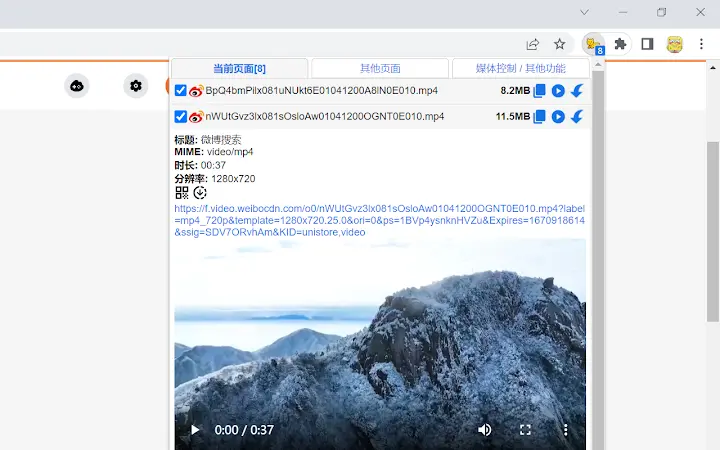
- URL Sniffing via Chrome API – The extension actively monitors network traffic to detect audio and video file requests, allowing users to retrieve download links that are otherwise hidden.
- Download with Custom Naming – Utilizes Chrome’s download API to enable users to rename files during the download process, resolving a common issue in earlier versions.
- Support for Non-Media Files via MIME Override – Users can configure the extension to recognize files with MIME type
application/octet-stream, which helps capture non-media content such as documents or archives. - Minimal System Footprint – At just 2.5 MB, the extension is lightweight and designed to operate efficiently without significant resource consumption.
- Secure Installation via Chrome Web Store – All installations are sourced directly from the official Chrome extension marketplace, minimizing the risk of malware or unauthorized modifications.
These features are especially valuable in scenarios where users need to extract media from websites that do not provide direct download options. For example, a student might use the tool to save lecture videos, while a researcher could archive audio interviews. The ability to override MIME types enhances flexibility, allowing users to capture files beyond standard media formats.
User Interface, Workflow & Performance
The user interface is minimal and integrated directly into the Chrome browser environment. No standalone window or complex dashboard is present, which keeps the experience streamlined and unobtrusive. Users interact with the extension through the browser’s toolbar, where a simple icon indicates its active status.
Workflow efficiency is high for basic tasks: once enabled, the extension automatically detects media requests. When a file is identified, a download prompt appears with the option to rename the file before saving. This process is consistent across supported platforms, though specific UI behaviors may vary slightly between Windows and Mac due to OS-level differences.
Performance observations are based on general software behavior patterns. The extension operates in the background and does not require constant user input. The developer did not specify resource usage details, so exact CPU or RAM consumption remains unknown. Stability appears reliable, given its long-standing presence since 2018. However, performance may be affected by the number of active tabs or network-intensive websites.
Compatibility & System Requirements
The software is compatible with Windows and Mac operating systems, supporting modern versions of the Chrome browser. It is designed to function as a Chrome extension, meaning it requires the Chrome browser to operate. The installation size is 2.5 MB, which is relatively small and suitable for most users.
Exact system requirements were not listed. The developer did not provide additional hardware or software prerequisites. Compatibility information is limited to the supported operating systems and browser environment. Users should ensure their Chrome browser is up to date to maintain full functionality.
Pros and Cons
Pros
- Efficiently captures hidden audio and video URLs from web streams
- Allows file renaming during download via Chrome API
- Lightweight at just 2.5 MB
- Secure distribution through the official Chrome Web Store
- Supports non-media file capture via MIME override
Cons
- Dependent on Chrome browser; not usable in other environments
- May require permission requests during installation – normal for Chrome extensions
- Does not support downloading encrypted or protected streams
- Functionality limited to URL sniffing; no built-in download queue or scheduling
- Older version (1.0.15) released in 2018 – may lack recent browser compatibility updates
FAQ Section
Is this extension safe to install?
The extension is distributed through the official Chrome Web Store, which enforces security checks. As long as it is installed from this source, the risk of malware is minimal. The developer did not provide additional security details.
Can I use this on Mac and Windows?
Yes, the extension is compatible with both Windows and Mac operating systems, provided the Chrome browser is installed.
Does it work with all websites?
No, it only captures media files that are loaded via standard HTTP requests. Encrypted or DRM-protected streams are not supported. Some websites may also block detection through their network protocols.
How do I update the extension?
Updates are managed automatically by the Chrome browser when available. Users should ensure their browser is updated to receive the latest version.
Can I download files without a direct link?
Yes, the extension detects media files in real time as they are loaded by the browser. It does not require a visible download button or link.
Final Thoughts + CTA
This Chrome extension offers a focused and reliable solution for users who need to extract audio and video URLs from web content. Its ability to rename files during download addresses a key usability gap, making it a practical tool for content archiving and offline access. While limited to Chrome and lacking advanced features like scheduling or queue management, its lightweight design and secure distribution make it a trustworthy choice.
Despite its age, the extension remains functional for basic media retrieval tasks. However, users should be aware that it may not support newer streaming protocols or browser changes. For more complex scenarios, tools like IDM or Wireshark may offer greater capabilities.
Download Streamline Media Downloads now to enhance your browser’s media extraction capabilities.
Guides & Tutorials for 猫抓 (cat-catch) Extension for Chrome
How to install 猫抓 (cat-catch) Extension for Chrome
- Click the Preview / Download button above.
- Once redirected, accept the terms and click Install.
- Wait for the 猫抓 (cat-catch) Extension for Chrome download to finish on your device.
How to use 猫抓 (cat-catch) Extension for Chrome
This software is primarily used for its core features described above. Open the app after installation to explore its capabilities.
User Reviews for 猫抓 (cat-catch) Extension for Chrome 0
No reviews found





